WCAG 2.2 in 2026: What Enterprises Must Fix Now (AA Realities)
By Yevhen Kliakhin | Published May 25, 2026
Executive Summary
Many enterprise teams still describe their estates as WCAG AA aligned, but the shipped experience often fails where modern interfaces became more complex: sticky chrome, dense responsive layouts, drag-first controls, inconsistent help paths, repeated form entry, and authentication that depends on memory or transcription.
WCAG 2.2 is a practical 2026 engineering target because it closes those gaps without asking teams to relearn accessibility from the beginning. The work belongs in design systems, component libraries, authentication ownership, QA coverage, and release governance - not only in audit spreadsheets.
Introduction: Why "We Already Do AA" Is Not Enough in 2026
A conformance claim and a usable experience are not the same thing. Large programs usually fail users through repeated patterns: shared navigation shells, overlays, responsive breakpoints, multi-step forms, authentication flows, and component libraries that reproduce one defect at scale.
There is also a regulatory nuance. WCAG 2.2 is the current W3C standard and the sensible forward target for product teams, while formal legal references can lag by jurisdiction and procurement policy. In Europe, European Accessibility Act measures apply from 28 June 2025, while EN 301 549 remains the key ICT accessibility standard. Teams should avoid saying EAA simply equals WCAG 2.2, but they should still plan WCAG 2.2 as the practical remediation direction.
What Actually Changed in WCAG 2.2
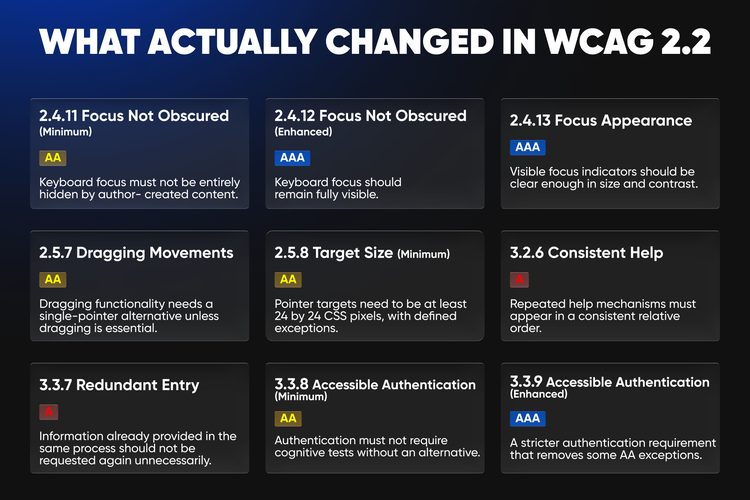
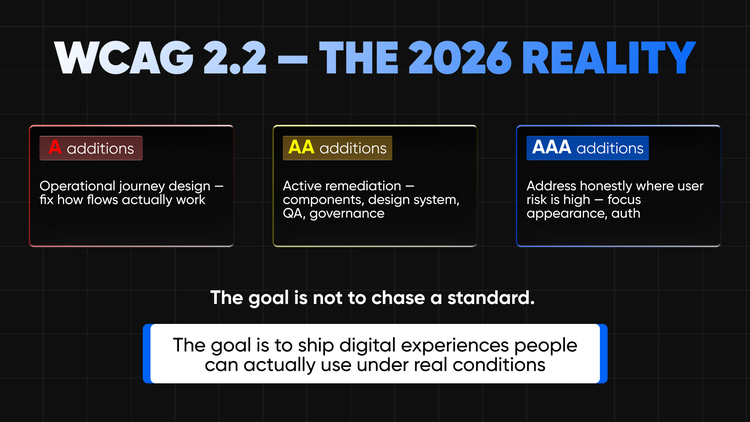
WCAG 2.2 adds nine success criteria compared with WCAG 2.1. The enterprise point is not only the count, but the level: AA criteria need direct remediation planning, A criteria shape whether users can complete journeys without avoidable support demand, and AAA criteria should be handled honestly as quality hardening rather than formal AA obligations.
Focus Appearance deserves special care. It is AAA, not AA, so enterprises should not label it as a new AA requirement. Still, weak focus indicators remain one of the most common reasons otherwise mature interfaces become difficult for keyboard users.
The AA Reality: What Belongs in the Backlog Now
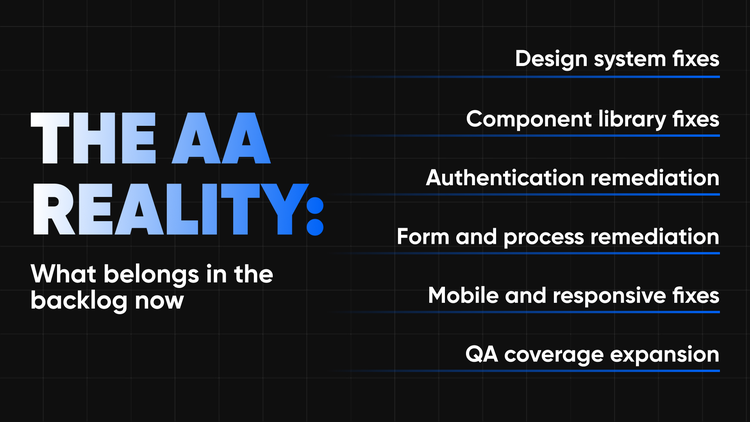
A useful WCAG 2.2 backlog is not a copied list of criteria. It is a set of delivery workstreams that design, engineering, QA, product, and compliance teams can estimate, test, and govern.
The leverage is centralization. A focus ring fixed in a design token can improve hundreds of components. A drawer pattern corrected once can prevent hidden focus across multiple brands. A standard authentication pattern can remove repeated defects across many journeys.
Focus: Where Minimum Compliance Ends and Real Usability Begins
Focus is the most sensitive part of the WCAG 2.2 update because it combines formal AA work with practical AAA hardening. At AA, Focus Not Obscured (Minimum) requires keyboard focus not to be entirely hidden by author-created content.
The usual offenders are sticky headers, fixed footers, cookie banners, chat widgets, alert bars, modal overlays, drawers, and responsive navigation panels. These defects are easy to miss when teams test only with a mouse or only at one viewport size.
Backlog items should be observable. Audit every sticky and fixed layer, define safe scroll offsets, test focus order against the real application shell, and verify that drawers and modals trap and restore focus correctly. CSS such as scroll-padding can help, but journey testing is what proves the result.
Dragging, Target Size, and Interaction Debt in Modern Interfaces

Dragging Movements
Dragging Movements is an AA criterion with immediate consequences for dashboards, content tools, commerce flows, and productivity platforms. Drag-and-drop can stay, but task completion cannot depend on dragging unless dragging is essential or handled by the user agent.
A sortable card list should offer move up, move down, move to column, or menu-based controls. A map should provide directional movement and zoom controls. A slider should support tapping, value input, or increment controls where appropriate.
Target Size Minimum
Target Size (Minimum) is another AA criterion that exposes interaction debt. WCAG 2.2 sets a 24 by 24 CSS pixel floor for pointer targets, with defined exceptions. This is not generous; it is a minimum intended to reduce accidental activation.
Dense enterprise interfaces need particular attention. Tiny row actions in data tables, compact pagination, filter chips, close buttons, calendar controls, and mobile nav icons may look efficient on desktop but become error-prone on touch devices, zoomed views, and hybrid hardware.
Help, Forms, and Authentication: The Process Layer Enterprises Still Get Wrong
Consistent Help, Redundant Entry, and Accessible Authentication point to the same problem: many accessibility failures live in the process layer. A page can have named controls and still make the journey inconsistent, repetitive, or cognitively demanding.
Consistent Help and Redundant Entry
Consistent Help is Level A. It does not require every page to contain help, but repeated help mechanisms should appear in a consistent relative order. Redundant Entry is also Level A and matters in checkout, onboarding, account updates, loan applications, insurance flows, service requests, and registration.
In backlog terms, help placement should become a shared template pattern, and information already provided in the same process should not be requested again unless there is a valid reason such as security, data expiry, or essential re-confirmation.
Accessible Authentication
Accessible Authentication (Minimum) is AA and business-critical. Login, MFA, password reset, account recovery, and verification flows are the front door to revenue, service delivery, employee productivity, and trust.
The remediation direction is practical: support password managers, allow copy and paste where appropriate, accept complete-code paste into segmented OTP inputs, provide clear recovery options, avoid CAPTCHA-like barriers where possible, and review MFA as a complete journey. Security and accessibility should reinforce each other, not compete.
Testing WCAG 2.2 at Enterprise Scale
WCAG 2.2 testing cannot rely on one-off audits or automation alone. Automated tools should run in CI, on preview environments, and across representative templates, but the new criteria involve interaction, visibility, cognition, and complete processes.
A layered model works best. Start with design-system tokens, focus styles, target sizes, spacing rules, overlay behavior, modal behavior, disabled states, error states, and help patterns. Then test components such as nav, dialogs, tables, filters, chips, sliders, maps, upload controls, carousels, OTP inputs, password fields, and support widgets. Finally, test complete journeys such as sign-in, registration, checkout, onboarding, profile management, claims, applications, service requests, and recovery.
Keyboard testing should cover tab order, visible focus, focus not obscured, focus trapping, escape behavior, focus restoration, and bypass behavior. Responsive testing should include target size, adjacent action spacing, touch behavior, zoom, orientation changes, sticky regions, and alternatives for dragging.
A Practical 2026 Prioritization Model
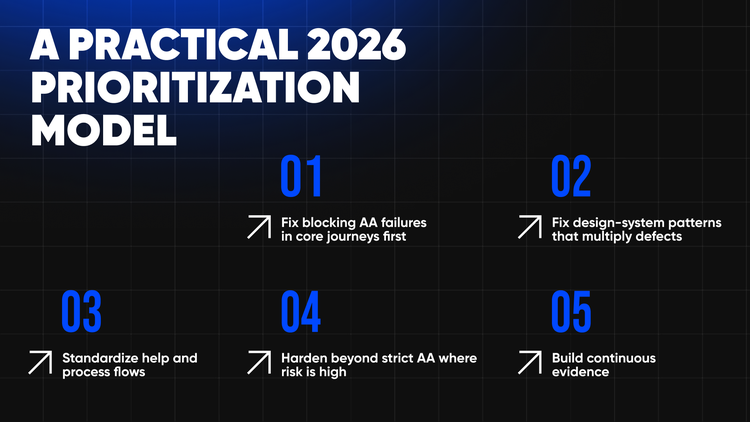
Leaders need more than a defect list. A defensible WCAG 2.2 remediation model should prioritize user impact, journey criticality, and defect multiplication.
This model helps accessibility leads, engineering managers, design-system owners, QA leaders, and product owners speak the same language. It also prevents teams from fixing low-impact page defects while leaving a shared component or authentication flow broken.
What This Means for Enterprise Delivery Teams
WCAG 2.2 is a signal that enterprise interfaces have become too fragile around persistent UI layers, complex responsive layouts, compact controls, drag-first interactions, inconsistent support structures, multi-step processes, and authentication experiences that assume too much from the user.
For platform owners, the work is architectural: shared shells, component libraries, design tokens, and front-end frameworks must encode accessible defaults. For product teams, the work is journey-based. For QA leaders, automation should scale detection while manual review validates interaction and usability. For compliance stakeholders, communication must be precise about WCAG 2.2 as a forward target and about legal references that may lag by jurisdiction.
DevHandler's role fits naturally here: shaping practical backlogs, improving component systems, implementing remediation cleanly, and building testing approaches that scale beyond a single audit.
Conclusion
In 2026, WCAG AA aligned should mean more than a familiar phrase in a procurement response. It should mean focus remains visible and is not hidden behind modern UI chrome, users are not forced to drag when a simpler pointer alternative can work, and touch targets remain usable in real responsive interfaces.
It should also mean help is predictable, multi-step processes do not ask for the same information again and again, and authentication does not create unnecessary cognitive barriers. WCAG 2.2 gives enterprise teams a clearer way to address these problems through component fixes, design-system rules, authentication improvements, QA coverage, and governance evidence.
The point is not to chase a standard for its own sake. The point is to ship digital experiences that people can actually use under real conditions: less checkbox accessibility, more enterprise delivery quality.
Read more: