Global-First Playbook: GEO Strategies & Multilingual Readiness with Adobe EDS and AEM Sites
By Yevhen Kliakhin | Published February 19, 2026
Why Global‑First? Trends Driving 2026 Digital Strategy
In 2025–2026, enterprises face unprecedented digital pressure: customers worldwide expect content in their language, tailored to local needs, delivered lightning-fast and updated in real-time. Legacy processes can’t keep up. Adobe’s ecosystem has rapidly evolved to meet these demands – AEM is now offered as a scalable Cloud Service, and new tools like Adobe Edge Delivery Services (EDS) for headless, edge-optimized delivery and the Universal Editor for in-context authoring are mature and ready for prime time. The stage is set for those willing to modernize their platforms and adopt a global-first mindset.
Global-first means treating every market as fundamental, not bolting on other countries as afterthoughts. For international web operations – from the U.S. to the EU and beyond – this mindset is critical. It influences everything: how you architect sites for multiple regions, how quickly you can publish across locales, and how you comply with each region’s laws. Two pillars of Adobe’s stack help enable this global approach: - Adobe Edge Delivery Services (EDS) – a new document-based, headless model to publish clean, fast HTML at the edge. - Adobe Experience Manager (AEM) Sites (both classic On-Prem and Cloud Service) – a robust CMS for deep content and component governance, now evolving to support headless and AI-friendly delivery.
In this playbook, we’ll explore how to leverage EDS and AEM Sites in a global-first strategy. We’ll focus on making content highly performant, crawlable, and AI- readable across regions, enabling multilingual SEO, and staying compliant with privacy laws. The goal: equip your global enterprise team with a blueprint to serve any market, any language with speed and governance.
Edge Delivery Services (EDS): Speed, SEO, and Content Velocity at the Edge
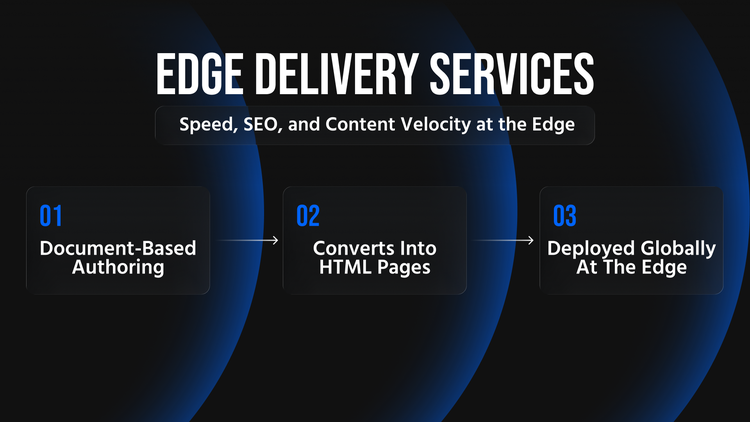
Adobe Edge Delivery Services (EDS) is a modern, edge-first content delivery platform that decouples content from the traditional AEM workflow. It enables document-based authoring – authors create and edit content in familiar tools like
Google Docs or Word, which is then automatically transformed into clean HTML and served via a global Content Delivery Network (CDN). EDS was formerly known as AEM “Project Franklin/Helix” and is now an integral part of AEM Cloud Service. It can coexist with AEM Sites on the same domain, allowing a hybrid approach where needed.
How EDS Works: Each page corresponds to a document in a linked cloud drive, structured with simple conventions. Content authors write in a normal doc, using headings, lists, and tables to denote structure. Behind the scenes, EDS converts these docs (via an intermediate Markdown) into static HTML pages, injecting standard components (headers, footers, etc.) and styling as defined by your front-end code. When authors publish, EDS deploys the page globally to the edge – meaning users anywhere get a fast, cached response. The result is unusually clean HTML output (no unnecessary div clutter or client-side rendering delays) that search engines and AI can easily crawl.
Clean HTML & Crawlability
One immediate benefit of EDS’s document-driven approach is the clean, semantic HTML it produces. Because pages are assembled from structured doc content and simple templates, the output is lightweight and well-structured (e.g. proper headings, paragraphs, alt text on images). This boosts SEO and even future-proofs content for AI consumption. Search engine bots and AI algorithms “thrive on clean code” – they favor pages that are server-rendered, semantic, and not buried in heavy scripts. In our experience, an EDS site can achieve near-perfect Lighthouse scores for SEO and Best Practices (DevHandler’s own site scores 100 in SEO), reflecting how accessible the content is to crawlers. In short: EDS makes pages inherently “AI-readable.” By delivering fully-formed HTML at the edge, it avoids the pitfalls of client-side rendering (which can delay or hide content from Google and generative AI indexes).
Blazing Global Performance (Core Web Vitals)
Performance is a cornerstone of GEO readiness – users in every region expect fast load times, and Google rewards fast sites with better rankings. EDS excels here by globally caching static pages on a CDN and minimizing server processing. Pages served via AEM EDS have been observed to load 3–6× faster than the same pages on legacy AEM 6.5 servers. That translates to dramatically better Core Web Vitals (e.g. Largest Contentful Paint and Interaction to Next Paint) and happier users. Essentially, with EDS your content is already assembled and waiting at the edge, so a user in London or Sydney gets a near-instant response, without a slow round-trip to a central server.
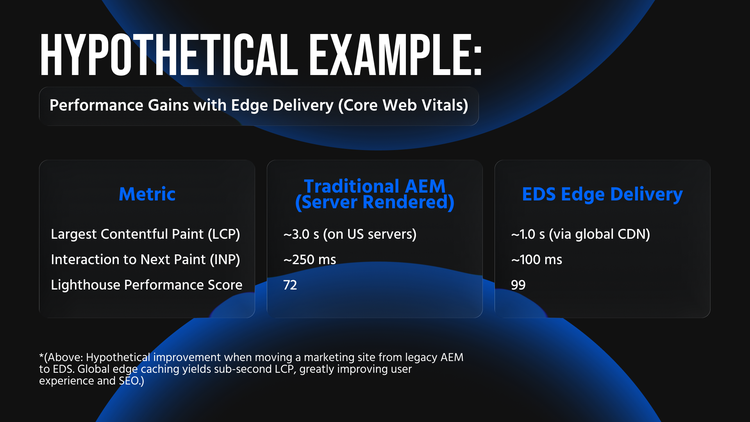
Hypothetical Example: Performance Gains with Edge Delivery (Core Web Vitals)
*(Above: Hypothetical improvement when moving a marketing site from legacy AEM to EDS. Global edge caching yields sub-second LCP, greatly improving user experience and SEO.)
These performance gains are not just theoretical. Companies that have piloted EDS on content-heavy pages (marketing landings, blog articles, FAQs) see immediate speed boosts – often turning previously sluggish pages into “near-instant” experiences for users worldwide. Faster sites mean better Google rankings (Core Web Vitals are a ranking factor) and higher conversion rates. Even a 100ms improvement in page speed can boost engagement, so a multi-second improvement is game-changing.
Faster Content Publishing & Author Autonomy
EDS also supercharges content velocity. Since content in EDS is edited in docs and decoupled from code, authors can publish updates without waiting on development cycles. A new page or change can go live in minutes after editorial approval – not days or weeks. DevHandler’s team, for example, can update their site via a Google Doc and see it live the same day, with no code deployment. This removes bottlenecks: marketing teams regain control of content scheduling, and developers are freed from constant small content tickets.
Key benefits of this decoupled, document-based workflow include:
- No Release Lag for Content: In a traditional AEM Sites setup, even minor text changes often required a full build and deployment (especially if part of a component). With EDS, saving the doc and hitting “Publish” is enough – content updates aren’t tied to code releases.
- Parallel Workstreams: Authors work in Google Docs, while developers work in the code repository on styling and new block types – neither blocks the other. This separation of concerns improves collaboration: engineers focus on functionality and performance, content editors focus on messaging, all within a unified pipeline.
- Document Versioning & Workflow: Using Google Drive or SharePoint means you inherit familiar version history and commenting for content. And Adobe provides a browser extension (Sidekick) to preview and publish changes safely. Authors can preview their page in a staging environment and then push live with one click, which is a drastic simplification compared to AEM’s traditional author->publish replication steps.
Hypothetical Example: Content Publishing Velocity
- Before (Legacy AEM Workflow): Marketing team submits copy changes to IT; changes go into a sprint, developers update components or dialogs, and the update is deployed in the next release. Time to publish: 1–2 weeks for a simple text change.
- After (EDS Document Authoring): Marketing team edits the content doc directly (or a copy in their drive), hits publish after review. The change is live globally the same day. Time to publish: hours (or even minutes for urgent fixes).
By accelerating content updates, EDS helps enterprises stay culturally and seasonally relevant in each market. Teams can rapidly launch localized campaigns (e.g. a holiday promo in the UK site and a different one for France) without heavy overhead. In an era when content freshness and relevance drive engagement, this agility is a huge competitive advantage. As one of our 2026 digital trends, we see that content quantity and update frequency are as important as quality – EDS gives you the engine to increase both.
GEO-Readiness and Multilingual SEO Support in EDS
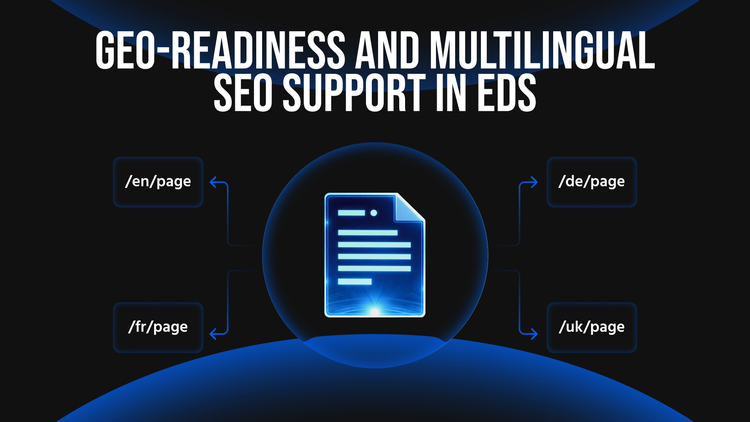
How does EDS support a global GEO strategy? First, global performance is built-in – every user, whether in the U.S., EU, or APAC, hits a nearby edge node for content. This levels the playing field; your EU site visitors, for example, won’t suffer slower speeds due to a U.S.-hosted server. Second, EDS’s content model is inherently friendly to multilingual and multi-region setups. You can maintain separate documents (or document folders) for each locale, each producing its localized HTML page. This means each language or country version of a page can be authored independently but follow the same template structure. The platform can easily map a URL structure that includes locale codes to corresponding doc folders – for instance, example.com/fr/page could map to a French doc, and .../en/page to the English doc.
Because all pages are static HTML, implementing hreflang tags for alternate languages is straightforward (developers can configure the template to include <link rel="alternate" hreflang="x"> for each available locale). Every localized page will have its own URL, allowing Google to index each language version separately – a must for international SEO. There’s no risk of geo-IP content cloaking or other crawlability issues; search engines see the full content for every locale. EDS even lets you include SEO metadata in the documents themselves (such as meta descriptions or titles), ensuring that SEO best practices are baked into the content creation process.
Finally, EDS integrates with Adobe’s analytics and personalization tools just like AEM Sites. You can use Adobe Target for A/B tests on EDS pages and Adobe Analytics for tracking. In other words, moving part of your site to EDS doesn’t mean abandoning personalization or tracking – it just means those need to operate in a more privacy-conscious, edge-friendly way (more on that in the compliance section). In fact, many organizations start by piloting EDS on a few sections (like a blog or support knowledge base) while keeping the rest on AEM Sites. This hybrid approach lets you capture quick wins in performance and authoring speed, without a big bang migration.
AEM Sites: Enterprise CMS Power – Now with AI-Friendly Practices
While EDS is great for speed and agility, Adobe Experience Manager (AEM) Sites remains critical for managing complex, enterprise websites. AEM Sites (whether the traditional on-prem 6.x or the modern AEM Cloud Service) offers rich content management capabilities: customizable components, templates, workflow approvals, digital asset management, and integration with countless enterprise systems. For global teams, AEM provides the backbone to handle deep content hierarchies, intricate page layouts, and multiple language sites in a governed way.
However, to make AEM truly global-first, teams must apply the right techniques so that AEM-produced content is as performant and crawlable as possible. Just because AEM can create dynamic, component-based pages doesn’t mean those pages have to be heavy or opaque to search engines. Below we outline strategies to ensure AEM Sites content is AI-readable, fast, and translation-ready.
Ensuring AI‑Readable, Crawlable Rendering (SSR over CSR)
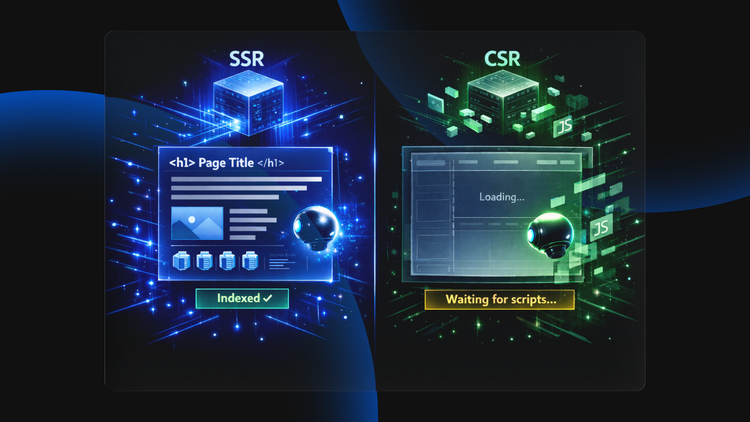
One key decision with any web platform is how pages are rendered. AEM Sites primarily uses Server-Side Rendering (SSR) – meaning pages are assembled on the server into HTML before being sent to the user. This is good for SEO, as the content is present in the HTML response. But modern web development sometimes introduces Client-Side Rendering (CSR) (for example, an SPA using AEM’s SPA Editor or heavy use of JS frameworks). As a rule, for SEO and AI visibility, SSR or hybrid rendering is preferred. Server-rendered content is immediately crawlable; purely client-rendered content might not be indexed if the bot doesn’t execute the scripts.
Best Practice: “Choose SSR or hybrid rendering to future-proof your website for search + AI/LLM.” In other words, ensure that baseline content loads in HTML. Use client-side enhancements sparingly, and if you build single-page apps in AEM, consider pre-rendering critical content or using AEM’s hybrid model (e.g., using AEM SPA Editor with SSR). Adobe’s latest guidance echoes this: platform choice and rendering model determine how far you can go in SEO and AI-driven visibility.
Concrete steps to make AEM Sites output more AI-readable include: - Use Semantic HTML in Components: Develop AEM components using proper tags (e.g. use headings <h1>..<h6> for titles, <article> for content pieces, etc.). Avoid excessive nested divs. This way, when AEM renders the page, it’s structurally sound for crawlers. - Enable HTML Caching / CDN: Even though AEM pages are dynamic, AEM Cloud Service supports dispatcher caching (and can work with CDNs). Serving cached HTML pages for anonymous users worldwide ensures fast loads similar to EDS. Leverage the CDN capabilities in AEM as a Cloud Service to bring content closer to regional users. - Optimize Front-End Delivery: Apply the same performance best practices: compress images, lazy-load below-the-fold content, minify CSS/JS. AEM’s Site Optimizer tool or Lighthouse audits can help pinpoint issues. Set up automated performance budgets so that no deployment regresses Core Web Vitals. - Structured Data & Metadata: AEM allows templates to include structured data (JSON-LD schema) and full control of <head> metadata. Use this to your advantage: output schema.org tags for things like organization, breadcrumbs, product information, etc., to enhance how your site appears in search and to feed AI assistants rich info. Ensure every page has unique meta titles and descriptions (AEM’s Page Properties can be used by authors to input these).
In practice, a well-implemented AEM Site can achieve excellent SEO results – but it requires discipline not to over-complicate the rendering. One 2026 recommendation is to keep AEM pages “static-first” in philosophy: if a page’s content can be published as mostly static HTML, do it. Use dynamic personalization or heavy JS only where necessary. This hybrid mindset can allow an AEM Sites implementation to approach the performance and crawlability of EDS. As an example, DevHandler’s own site (running via EDS) hits 99–100 in Lighthouse for Performance and SEO; with effort, an AEM Sites page can also score high (we routinely target 90+ Lighthouse scores on AEM projects by following these methods).
Multilingual Workflows and Translation in AEM
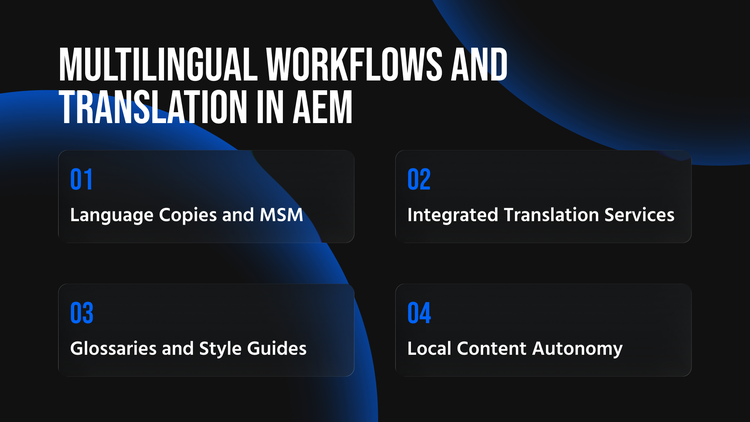
AEM Sites was built with multilingual content in mind – it’s one of AEM’s strongest suits for global companies. To leverage this fully, consider these multilingual workflow strategies:
- Language Copies and MSM: AEM allows you to set up a master site (often in the primary language, e.g. English) and create language copies for each locale. Using Multi-Site Manager (MSM), you can synchronize content between the master and translations, while still letting local editors make regional customizations. For example, you might have a master /content/site/en and a Spanish copy /content/site/es that inherits structure from the English. When a new page is added or a component is updated in English, AEM can propagate that to Spanish (either automatically or with a workflow), flagging it for translation updates. This ensures structural consistency across locales (no missing pages) while enabling local variation where needed.
- Integrated Translation Services: AEM Cloud Service integrates with various Translation Management Systems (TMS) and also offers the Adobe Translation Integration Framework. Editors can send content out for translation directly from AEM’s interface (for human translation) or even use machine translation for a first draft. Best practice is to use AEM’s translation workflows to manage these jobs – it keeps track of what’s translated and what isn’t, and can auto-create translated pages when translations are back. This governance is crucial at enterprise scale (hundreds of pages in a dozen languages). It provides a translation governance mechanism: you can enforce that no page goes live in a secondary locale until it’s been translated and reviewed.
- Glossaries and Style Guides: From a content governance perspective, maintain a global term base for common product names or slogans, and a style guide for tone. Your translators or local authors should follow these to keep brand voice consistent. AEM doesn’t enforce this, but your global content team should – it prevents each country from sounding too divergent. For instance, decide whether the U.S. tagline is translated literally or adapted per culture, and document that.
- Local Content Autonomy: Despite central governance, allow regional teams some flexibility. AEM’s component permissions and blueprint configurations can let certain components be “unlinked” in live copies so local editors can swap out an image or a blurb to suit local tastes. Embrace a model of global templates, local content. Your templates (the layout, design, structure) remain global to ensure consistency and quality, but the words and images can be tailored per locale.
Crucially, every localized page in AEM should implement proper hreflang tags linking it to the other language versions. This tells Google “here are the alternate versions of this content for other languages/regions”. AEM doesn’t do this out-of-the-box, but it’s straightforward to add in your page component – many AEM sites generate an <hreflang> link for each sibling locale. Remember to include an x-default hreflang for the default/fallback page (often the English or global page). Proper hreflang prevents duplicate content confusion and ensures users from France land on the French page, Germans on the German page, etc. It is essential for GEO SEO, as failing to implement hreflang can result in the wrong language page showing in a given market, hurting both user experience and rankings.
AEM Cloud Service Innovations: Hybrid Authoring and AI Integration
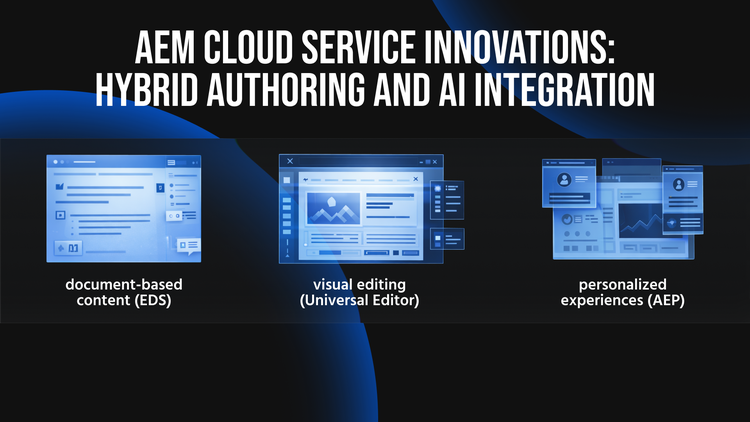
Adobe’s move to Cloud Service brings new features that specifically address global authoring challenges. One is the Adobe Universal Editor (introduced ~2026), a next-gen WYSIWYG editor that works across any front-end. This means in an AEM Cloud environment, your authors could potentially use a visual page editor even for headless or EDS content. Why does this matter? It unifies the authoring experience – marketers get in-context editing for portions of the site that are headless or document-based. For example, your team might use Google Docs (document-based) for campaign pages, but the Universal Editor for richer pages within AEM Sites, all in one interface. This dual authoring model gives flexibility: use the right tool for the job. And importantly, the Universal Editor is designed to produce clean, structured content, maintaining AI-readability. It’s a signal that Adobe recognizes the need to support hybrid stacks: you can run EDS and AEM Sites together and let authors edit both seamlessly.
Another innovation is deeper integration with Adobe Experience Platform (AEP) for personalization and analytics. AEM Cloud can tap into AEP’s unified customer profiles to deliver personalized experiences by segment – e.g. showing different content to a first-time visitor vs. a return customer, or to a user in one industry vs another. However, as we’ll cover next, personalization must be handled carefully under varying data laws.
Hybrid Strategy: Choosing (and Combining) EDS vs. AEM Sites
Global enterprises don’t have to choose one approach exclusively. In fact, a common pattern is a hybrid stack: use EDS for what it does best and AEM Sites for what it does best, in a complementary way. Adobe has made sure that EDS and AEM Sites can coexist in the same domain and share services, so users experience a single website. For example, your marketing and blog sections might be served via EDS (static content, updated daily by authors), while your product catalog and authenticated user portal are served via AEM Sites (dynamic content, complex integrations). To the end user, it’s one site – navigation is seamless. Under the hood, your devops can route certain path patterns to EDS’s CDN and others to AEM’s publish service.
When to use which? Here’s a simple decision framework:
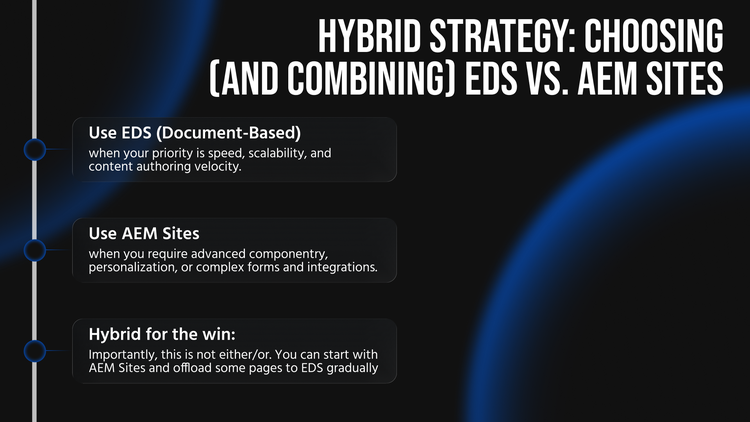
- Use EDS (Document-Based) when your priority is speed, scalability, and content authoring velocity. If a section of the site needs to be extremely fast and is largely informational (text, images, rich content) with less need for on-the-fly server logic – this is perfect for EDS. Also, if marketing needs to push updates very frequently (multiple times a day) or spin up new pages for campaigns without developer involvement, EDS provides that freedom. Examples: marketing landing pages, blogs/news, help centers, promotional micro-sites, country-specific campaign pages. These benefit from maximum crawlable HTML and can dramatically improve SEO by cutting load times. As a rule of thumb, if you need maximum crawlable HTML + speed + author agility, lean EDS.
- Use AEM Sites when you require advanced componentry, personalization, or complex forms and integrations. If a page involves logged-in user data, e-commerce functionality, or intricate components that content authors assemble in various configurations, AEM’s traditional CMS strength shines. Also, enterprise governance features like detailed user permissions, content approval workflows, and integration with other Adobe Experience Cloud products (Target, Forms, etc.) are strengths of AEM Sites. For instance, a product detail page pulling data from a commerce system and allowing user reviews would be better in AEM Sites. If you need deep component governance and complex authoring, AEM Sites is the choice – but enforce the same AI-readable standards on those pages. This means configuring AEM Sites to output fast, SSR HTML and avoiding practices that hamper crawlability (as discussed earlier).
- Hybrid for the win: Importantly, this is not either/or. You can start with AEM Sites and offload some pages to EDS gradually. Many organizations pilot EDS in one locale or one section to see results (Adobe’s guidance suggests this approach). Over time you might migrate more sections to EDS, while still using AEM for others. The key is to maintain design consistency – using the same CSS and style guide across both, so an EDS page and an AEM page have the same branding. Adobe’s Cloud architecture supports this: you can even share components in the sense that EDS “blocks” are analogous to AEM components, implemented by the front-end code. A developer can port an AEM component’s look into an EDS block, enabling reuse of design patterns.
Decision Rule: If you need maximum crawlable HTML + speed + author velocity, lean EDS; if you need deep component governance and complex authoring, use AEM Sites – but enforce AI-readable rendering standards on those pages. This rule of thumb echoes the idea that “your platform determines how far you can go in SEO and AI visibility… and SSR/hybrid rendering is critical to not be invisible to crawlers”. In practice, many global enterprises will use both – EDS to turbocharge key landing pages and ensure they're globally fast, and AEM for the heavyweight lifting elsewhere. The combination, when done right, means you’re never compromising: each part of your web presence is delivered in the optimal way.
Privacy‑First Personalization & Compliance (EU vs. US Considerations)
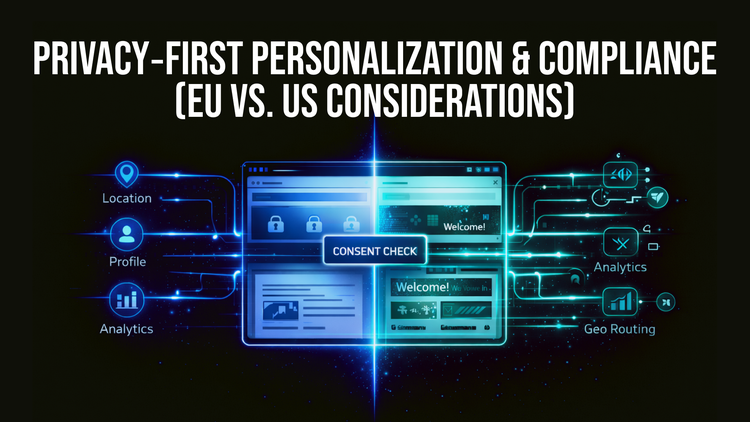
Operating a global web platform means navigating different data privacy regimes, especially between the U.S. and EU. Europe’s GDPR and related laws (ePrivacy Directive, etc.) impose strict requirements on how you collect and use personal data – which directly impacts personalization, analytics, and GEO-based content delivery.
GDPR and Personalization: Under GDPR, personal data includes things like online identifiers and location data (yes, even an IP address that reveals a user’s country is personal data). Any form of personalized content or automated profiling of users typically requires a lawful basis – consent being the most straightforward for marketing use cases. This means if you want to personalize page content based on a user’s location, behavior, or profile attributes in the EU, you likely need to obtain the user’s affirmative consent first. For example, showing a localized homepage banner because the user is in Germany is a form of targeting that should be done only after the user consents to location-based personalization. Many companies implement this via a Consent Management Platform (CMP) banner: the user opts in to “Personalization” cookies or similar, which then allows the site to utilize location or profile data for content variation.
Impact on GEO Content Delivery: If your site automatically redirects or geotargets content based on the user’s location or language settings (common for global sites), design it in a privacy-friendly way. A best practice is to be transparent and offer choice: for instance, rather than silently redirecting a user from your .com site to a /de German site, show a prompt: “We think you’re in Germany, would you like to view the German site?” This way, you’re not using their location in a covert way – you’re asking. It both improves user experience and aligns with the spirit of GDPR’s transparency requirements. If you do automatic locale routing, ensure you document this in your privacy policy and that you’re only using the data for the intended purpose (purpose limitation). Also, geolocation precision matters: using a general location (e.g. country based on IP) might be considered less invasive than precise GPS-level targeting, but GDPR still applies. Many organizations choose to treat any geolocation as sensitive unless it’s absolutely necessary, collecting only what they need (data minimization).
Analytics & Measurement: In the EU, dropping analytics cookies or tracking scripts also typically requires consent. Adobe Analytics, Google Analytics, and similar can be used in a GDPR-compliant way by integrating with your CMP. AEM and Launch (Adobe’s tag manager) can be configured to only fire analytics beacons after consent is given. One tip: implement a two-layer consent – essential cookies vs. marketing/analytics cookies – so that your site can still perform basic functions without tracking, and only do in-depth tracking when allowed. From a GEO perspective, U.S. audiences might be auto-tracked (since U.S. has an opt-out paradigm in many cases), but EU audiences see an opt-in dialog. Your systems must accommodate both without breaking the user experience.
Adobe’s tools are increasingly privacy-aware. For instance, Adobe Experience Platform (AEP) allows data labeling (to tag which data is subject to GDPR or sensitive) and has APIs to fulfill data deletion requests. When integrating AEP for personalization, honor the consent flags: only use segments that are built on data the user has allowed. DevHandler’s approach (and our advice) is to ensure any personalization or A/B testing is “consent-based” by design. This might mean building logic into your AEM components or EDS scripts to check a consent state before showing personalized content or before loading third-party resources.
Data Residency: Another EU consideration is where user data is stored/processed. GDPR doesn’t mandate EU-only data storage per se, but transfers of personal data out of the EU (e.g. to U.S. servers) require specific safeguards (like Standard Contractual Clauses). Adobe’s AEM Cloud and AEP offer European data center options – if your company policy or regulatory environment (e.g. banking, government) demands that EU personal data stays in-region, you can deploy the Adobe stack in EU regions and avoid cross-Atlantic transfers for end-user data. This is more of an architectural choice, but it’s worth calling out when planning a global deployment: host content and user data in the region closest to users wherever possible, both for compliance and performance.
Consent Logging and Preferences: Give users (especially EU users) easy ways to adjust their preferences. E.g., a “Cookies Settings” link to revisit consent, or an account preferences center to opt in/out of personalized content. AEM can integrate with such preference centers or provide components for them. This not only fulfills legal requirements but builds trust: global users are becoming more aware of privacy. As Adobe’s Chief Privacy Officer noted, brands can build loyalty by focusing on user privacy while still delivering contextual experiences.
In summary, “privacy-first personalization” means designing your GEO personalization to first do no harm: get consent, be transparent, and use the minimum data needed to deliver a relevant experience. In the U.S., you might get away with more implicit personalization, but adopting the stricter EU mindset globally can actually simplify operations (one rule-set to follow) and earn user trust. By baking compliance into your personalization and analytics strategy, you ensure that your global expansion doesn’t hit legal roadblocks or erode user confidence.
International SEO and Multilingual Content Best Practices
Serving multiple regions and languages isn’t just a content challenge – it’s a technical SEO challenge. A global-first playbook must include tactics to maximize search visibility across languages and ensure content is organized for both users and search engines. Here are the key best practices for GEO and multilingual SEO:
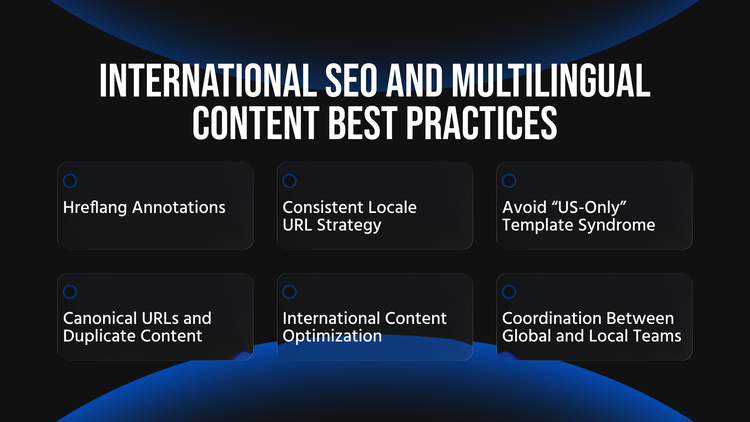
- Hreflang Annotations: Implement hreflang tags on all pages that have alternate language or regional versions. Hreflang tells Google and other search engines which page to serve to users based on their language/locale. For example, your U.S. English homepage would have tags pointing to the UK English, French, German versions, etc., and vice versa. All alternate versions (including the page itself) should be listed in each page’s hreflang set (this is called “return links” or self-referencing hreflang). Also include an x-default hreflang pointing to a default page (often the global.com or English) for users with languages you haven’t specifically targeted. Proper hreflang implementation ensures, for instance, that a French user sees your French site in results, not the English site. It prevents the scenario of Google showing the wrong regional page to the wrong audience, which can hurt your click-through rates and user engagement.
- Consistent Locale URL Strategy: Decide on a clear URL structure for locales and stick to it. Common approaches are subdomains (e.g. fr.example.com), subdirectories (example.com/fr/...), or country-code domains (example.fr). AEM and EDS both can accommodate any structure; the choice often depends on marketing preferences and infrastructure. Subdirectories (folders per locale) are popular because they consolidate SEO authority on one domain and are easier to manage under one AEM instance or EDS project. For example, Adobe’s site might use example.com/de/ for German. Whichever approach, ensure the locale is indicated in the URL. Do not serve different languages on the same URL via geolocation alone – that’s bad for SEO (search engines might only index one version) and can confuse bots. Each language/country version needs its own discoverable URL. Consistency also means using standard language codes (prefer ISO language and country codes, e.g. “en-US” for English United States, “en-GB” for English UK, “fr-FR” for French France). This makes mapping locales to content and analytics unambiguous.
- Avoid “US-Only” Template Syndrome: A critical strategic point: If you operate in multiple markets or languages, treat GEO as a global operating model with local execution – don’t ship “US-only” templates.” In practice, this means when designing your website and content templates, assume from day one they will be used in many locales. Do not hard-code U.S.-specific content or assumptions. For example, avoid embedding English text in images (harder to localize), avoid U.S.-centric examples (like only showing prices in USD on a template), and design layouts that can handle text expansion (German or Russian text can be much longer than English). This decision rule is about mindset: the U.S. site is just one of the locales – it’s not the “default” with others as afterthoughts, but rather all locales are equal variants of one global experience. By planning this way, your site will be more scalable. It’s easier to add a new country site when your templates are already localization-friendly. Teams in Europe or Asia often complain when a site clearly was designed just for America and retrofitted; avoid that by global-first design**. A practical tip is to involve representatives from different regions early in the design process for feedback and to pilot new features in at least one non-US locale to ensure the approach generalizes.
- Canonical URLs and Duplicate Content: International sites sometimes have overlap in content (e.g. an English article might appear on both a US and UK site, nearly identical except maybe price or unit differences). As a rule, if content is explicitly targeted to different regions, you should still keep them as separate pages (with hreflang linking them) rather than canonicalizing one to the other. Hreflang signals to Google that they are equivalents for different audiences, so you typically use self-canonical on each and let hreflang do its job. Only use a canonical tag across locales if one page is truly the exact same and you don’t want the other indexed at all. In most cases, you do want each locale indexed (even if the difference is minor), because a UK user searching will prefer a UK site result. That said, within a single locale site, use canonical tags to manage any duplicate content (e.g. if the same page is accessible at multiple URLs like with/without a slash or query params). AEM can help manage canonical tags via its link rewriting and site structure, and authors can have a field to specify a canonical if needed. Keeping a clean URL structure and using hreflang correctly will minimize duplicate content issues on international sites.
- International Content Optimization: SEO isn’t just technical; ensure you optimize content in each language with relevant keywords and cultural nuances. Simply translating the U.S. content word-for-word might not be enough – you may need to adapt it (transcreation) for it to rank well and resonate. For example, the search keywords in German for your product might differ from English. Work with local SEO specialists to fine-tune metadata and on-page text. AEM’s multi-site setup can allow local teams to adjust content while keeping the overall template consistent. Also consider localizing elements like metadata, alt texts, and even structured data (some schema markup like addresses or phone numbers should reflect local info).
- Governance: Coordination Between Global and Local Teams: Establish a governance model for how content updates happen globally. Perhaps the U.S. (or a central team) provides a master version of product content, then local teams get a notice to update their copies. Use AEM’s project/workflow features or even a simple spreadsheet tracker for major content launches (product launches, campaigns) to ensure each locale goes live with their version on time. Regular audits are useful: e.g., quarterly check that all high-value pages exist in all supported languages and are up to date. Nothing is worse for user experience or SEO than an out-of-date or missing page in a certain language (it can cause users to hit 404s or find irrelevant info, and search rankings will suffer accordingly). Make it standard practice to treat content as a globally shared asset, with local variations.
Hypothetical Example: SEO Gains from Multilingual Optimization
A global company had a single English (.com) website with 1 million monthly impressions, mostly from the U.S. and a few other English-speaking regions. They expanded to 5 new languages with proper subfolder sites (and hreflang tags linking them). Within a few months of launch, total search impressions grew to ~1.3 million (+30%), and importantly, non-English markets saw huge lifts. For instance, their Spanish site (previously non-existent) went from 0 to 200k impressions, as it started ranking for Spanish queries that the English site could never capture. This hypothetical illustrates how investing in localized content and SEO can unlock traffic that wasn’t reachable before. It’s not just about splitting the same pie; it’s about growing the pie by being relevant in more markets.
Conclusion: Embrace Global-First, Powered by the Right Stack
In summary, succeeding in multiple markets and languages requires a holistic approach – organizational, technical, and strategic. You need the agility to publish anywhere fast, the governance to maintain quality and consistency, and the cultural intelligence to localize effectively. Adobe’s dual offering of EDS and AEM Sites, especially when used in tandem, provides a powerful toolkit to realize this global-first vision:
- Adobe EDS offers unprecedented speed and independence for content teams, ensuring every regional site can be as fast and crawlable as a static site, with content updates rolling out at the speed of local business demands.
- AEM Sites offers a mature backbone for content governance, complex components, and integration – all of which are essential for a large enterprise juggling global brand consistency with local market needs.
- Privacy and Compliance are not optional – bake them into your design. Respect user consent and data laws from the start, and you’ll avoid costly retrofits or user mistrust later.
- Multilingual SEO is a make-or-break factor for global digital success. Use every tool at your disposal (hreflang, locale-specific content, structured data, etc.) to ensure your content actually reaches its intended audience.
By following this playbook, global enterprise teams can transform their web operations into a global operating model with local execution. The technology is ready – as of 2026, cloud-native and edge delivery solutions are mature. The challenge now is mainly cultural and procedural: breaking the habit of U.S.-centric thinking and siloed launch cycles. Those who adopt a global-first mindset, empowered by EDS for speed and AEM for scale, will be able to deliver web experiences that feel local to every user yet are managed on a unified global platform. In doing so, you not only improve site performance and SEO – you also position your organization to thrive in an AI-driven, privacy-conscious digital future where relevance and trust are the currencies of success.
Read more: