AI-Generated Content at Scale in AEM (2026 Playbook)
By Yevhen Kliakhin | Published January 27, 2026
Introduction:
Enterprise content teams are facing a new reality: demand has exploded. Brands are expected to publish dramatically more content, in more formats, across more channels—and increasingly tailored to specific audiences—without expanding timelines or headcount. Traditional, manual content production simply can’t keep up. That’s why “AI-assisted content operations” are quickly moving from experimentation to necessity: they offer a practical path to higher velocity, lower cost per asset, and faster iteration while keeping humans firmly in control of quality and approvals.
The urgency is rising for another reason: the way customers discover content is changing. AI-powered search and assistants increasingly answer questions directly, pulling from sources they can access, interpret, and trust. If your content isn’t structured, crawlable, and optimized for these AI experiences, your brand risks becoming invisible inside AI-generated answers—even if you still rank in classic search. Early signals already show how real this shift is: AI-referred traffic is spiking and, in many cases, converting better than traditional SEO traffic, making “discoverability for AI” a strategic priority, not a technical nice-to-have.
This article lays out a practical blueprint for bringing generative AI into Adobe Experience Manager (AEM) without turning your content factory into a compliance nightmare. We’ll cover a reference architecture for integrating AI into AEM workflows, an operating model with clear roles and accountability, and governance patterns that scale with volume. Finally, we’ll translate it into a phased 2026 roadmap—starting with low-risk pilots, expanding to production-grade workflows, and measuring success through KPIs that balance speed, quality, risk, and search impact.
Problem Definition

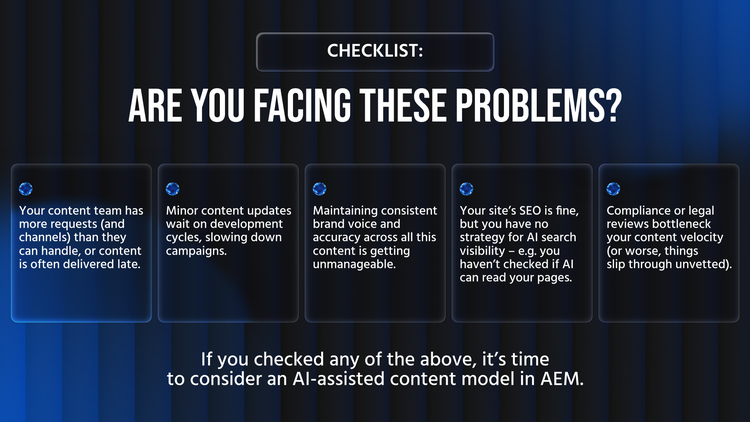
Enterprise marketing and digital teams are under unprecedented pressure to produce and update content. In 2025–2026, customer expectations demand fresh, personalized content across more channels and segments, in real-time. Traditional content pipelines – even with AEM – often can’t keep up with this scale. The result is a growing content backlog, missed opportunities (e.g. delayed campaigns equating to lost revenue), and overworked content teams. Simply put, manual processes don’t scale to the volume and speed now required.
At the same time, AI is changing the game for content discovery. Search is no longer just “10 blue links” – users are turning to generative AI answers (Bing Chat, Google’s SGE, ChatGPT plugins) that pull from web content. If your content isn’t visible and citable to AI, it might as well not exist. Many enterprise sites have rich experiences for humans but yield almost blank results for AI crawlers (e.g. heavy SPAs where an AI agent sees only 17% of the content). This is spawning a new discipline of Generative Engine Optimization (GEO) – making content AI-accessible – as a C-suite concern. Ignoring it means risking that your competitors’ content fills the void in AI answers.
Finally, quality and consistency remain paramount. Generative AI can produce content at remarkable speed, but without guardrails it may generate off-brand messaging, factual errors, or even compliance violations. Enterprise leaders must balance the need for speed with risk management – ensuring brand integrity, legal compliance, and customer trust are not sacrificed on the altar of scale.
Reference Architecture for AI + AEM
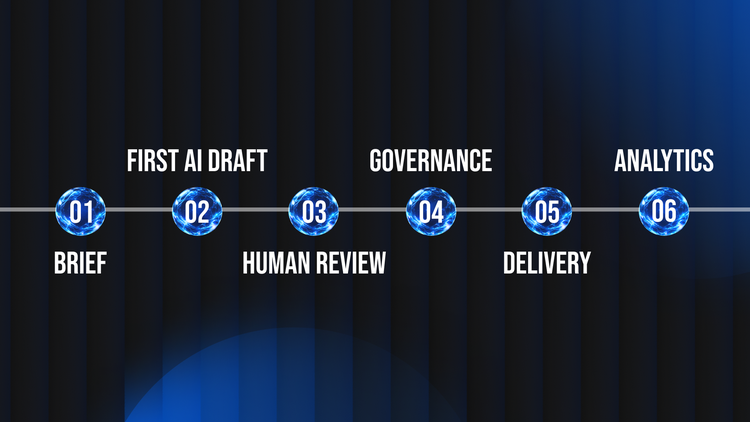
Successfully operationalizing AI-generated content in AEM requires an architecture that interweaves AI services with AEM’s content management and delivery pipeline. At a high level, the architecture involves: 1) the AEM platform (Cloud Service or on-prem) where content is authored and managed, 2) one or more Generative AI services (Adobe’s or third-party) that produce content suggestions or variations, and 3) a workflow/orchestration layer tying them together with governance controls. The diagram below shows a reference flow of how generative AI can fit into AEM’s content lifecycle:
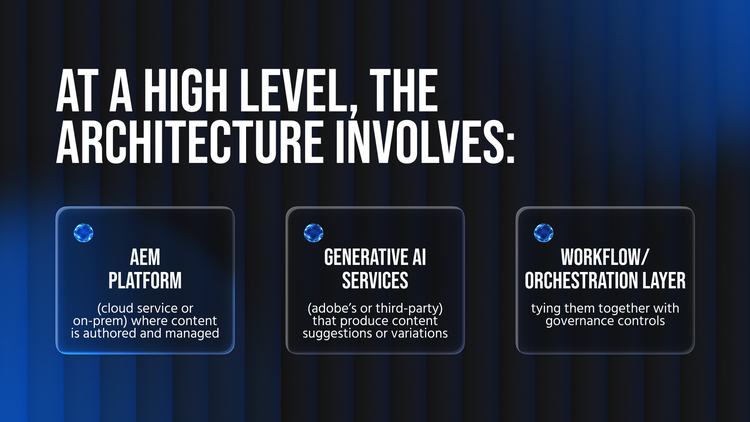
Figure: AI-assisted content workflow in AEM – content is drafted by an AI, then passes through human editing and governance gates before publishing. Metrics and insights feed back into planning.
In this setup, content creation starts with a brief (from a marketer or content strategist) that feeds an AI prompt. AEM’s latest releases include built-in generative AI capabilities for this step – for example, Adobe has introduced Content Assistants in AEM that let authors generate text or page variations with prompt templates right inside the authoring interface. These prompts can be optimized for enterprise use (with fields for tone, audience, etc.), lowering the barrier to getting a good first draft. Notably, any data entered is not used to train the model, preserving privacy – critical for enterprise use.
Depending on your needs, the AI service could be Adobe’s own (which benefits from deep Experience Manager integration and enterprise security) or an external API (OpenAI, etc.) integrated via AEM workflows or microservices. For example, an AEM Workflow could call an external AI service to generate a first draft of an article, which is then stored as an AEM page for editing. In either case, AEM acts as the orchestration hub: content is never published without passing through AEM’s repository and workflow (ensuring you maintain control over what goes live).
After generation, human-in-the-loop editing is crucial. The AI draft enters AEM as an unapproved content version. Authors or editors then refine the AI output for accuracy, style, and context. This happens in AEM’s authoring environment – which could be the classic TouchUI or a headless editing approach (DevHandler’s own site uses a document-based authoring model via Adobe EDS, meaning editors work in Google Docs and content syncs to AEM). The key is that humans validate and improve the AI content within your normal CMS workflow.
Next, content goes through governance checks (more on this in the next section). Only after passing quality and compliance gates is it approved for publishing. Publishing pushes the content to AEM Sites or a headless delivery layer, where it’s served to users (and crawlers). AEM’s Cloud architecture, especially with Edge Delivery Services, can transform approved content into highly optimized, static pages globally cached at the edge – ensuring both real users and AI bots get a fast, easily digestible experience.
Finally, the architecture closes the loop with analytics and monitoring. AEM’s integration with Analytics and tools like the LLM Optimizer extension provide insight into content performance and AI visibility. For instance, you might track how an AI-generated variant performs in an A/B test, or use the LLM Optimizer to see what portion of a page an AI could read. These insights feed back into the planning phase (content brief), allowing continuous improvement of prompts and content strategy.
Trade-offs and considerations: Deciding between Adobe’s out-of-the-box AI and external AI services depends on requirements. Adobe’s built-in GenAI (under the Sensei/Content AI banner) offers ease of use and compliance (it’s “secure by design” on first-party data), but you’re somewhat limited to the features Adobe provides. External AI models might offer specific strengths (e.g. a domain-specific model or a different image generator) but will require custom integration and careful vetting (for security, latency, cost, etc.). In all cases, do not generate content on the fly at runtime for end-users unless absolutely necessary – it’s generally better to generate in authoring or offline, so content can be reviewed and cached. Use AI to accelerate authoring, then serve the final content through AEM’s high-performance delivery layers.
Operating Model – Roles, Workflow & RACI
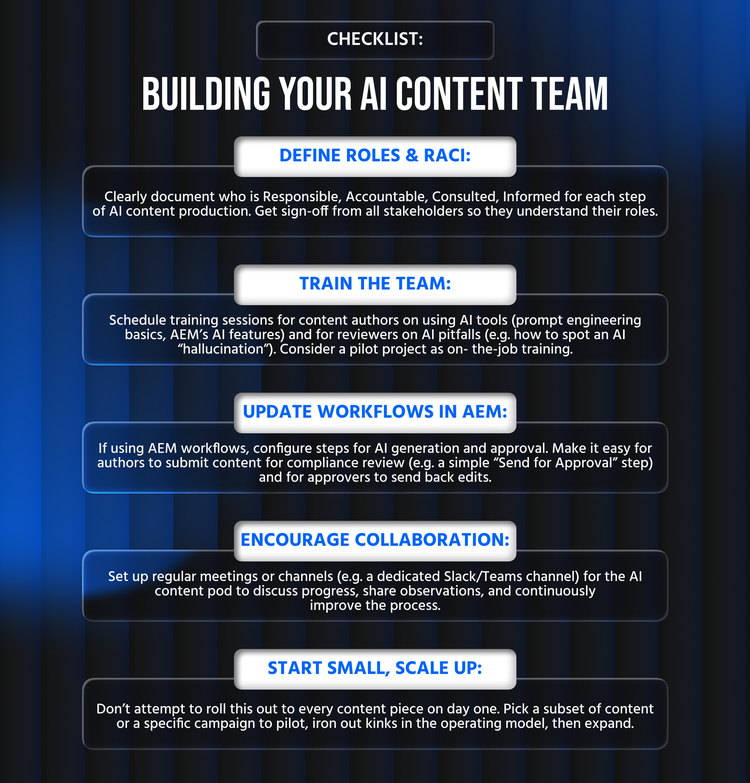
New technology alone won’t succeed without the right operating model. Introducing generative AI into content ops changes how different teams collaborate – and without clear roles and responsibilities, you risk chaos (or at least duplication and gaps in work). We recommend setting up a cross-functional content operations pod (or virtual team) that includes marketing/content, technical, and compliance stakeholders. This pod should treat AI as a “team member” that needs oversight. The best practice is to establish a RACI matrix (Responsible, Accountable, Consulted, Informed) for key steps in the AI content workflow. This leaves no ambiguity about who does what at each stage.
Common roles to involve in AI-assisted content production include:
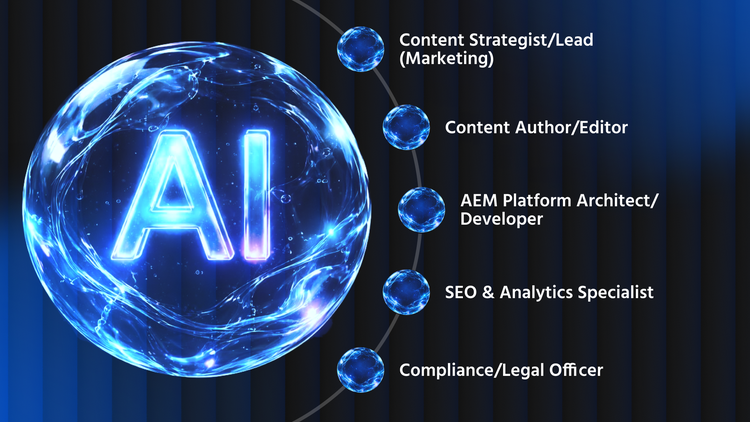
Of course, titles may vary, and in some organizations one person might wear multiple hats (e.g. a marketing manager could also be the content strategist). The key is to cover all these functions. Below is an example RACI for a typical AI-content process:
R = Responsible (does the work), A = Accountable (final authority), C = Consulted (provides input), I = Informed (kept in loop).
This RACI matrix is a template – you should tailor it. The core idea is that marketing leads are accountable for content outcomes, creators are responsible for AI generation and editing, tech supports the tools and performance, SEO guides optimization, and compliance is the gatekeeper for approvals. Everyone knows their part in the assembly line. Real-world tip: it helps to document this RACI and socialize it with all team members before you scale up AI usage. Hold a kickoff workshop so that, for example, the compliance officer knows when and how content will come to them for review, and the content authors know what SEO inputs to expect, etc. This prevents the “left hand not knowing what the right is doing” as volume increases.
Another operating model consideration is skills and training. Using AI in content creation is a new skill for many. Invest in upskilling your content team on how to write effective prompts, how to fact-check AI outputs, and how to use AEM’s AI features. Similarly, brief your compliance and brand teams on what generative AI can and cannot do, so they know what to watch out for. Some organizations create an “AI content playbook” – a short guide on approved use cases, tone, and process for AI content – to ensure consistency.
Communication is also key. Daily stand-ups or weekly content planning meetings that include a quick check-in on AI-generated content progress can help surface issues early. In DevHandler’s experience, tight-knit “pods” with clear roles (as above) and frequent communication produce the best results – everyone is aligned and potential problems (like a model misbehaving or a slowdown in review cycles) are identified and resolved collaboratively.
Governance and Compliance at Scale
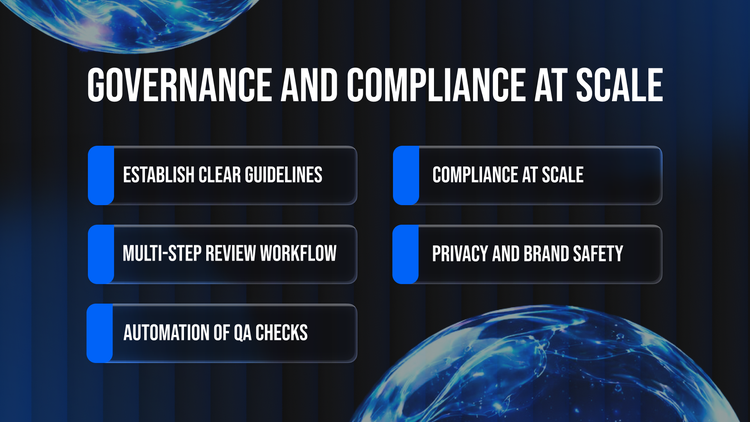
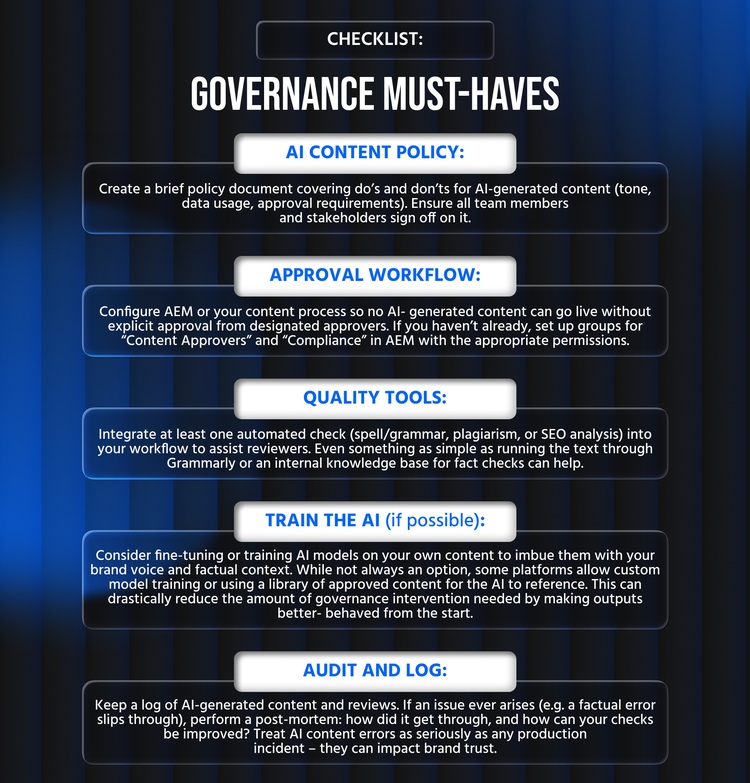
When you introduce AI into content production, governance isn’t optional – it’s a necessity, and it must scale with your content volume. Without strong governance, “AI at scale” can quickly turn into an out-of-control risk factory, from off-brand messaging to legal infractions. The goal of governance is to ensure that every piece of content meets your standards and requirements, even when an AI helped generate it. That means putting in place both processes and tools to uphold quality, compliance, and ethics.
1. Establish Clear Guidelines: Start by defining what “good” content looks like for your brand and industry. This includes your brand voice and style guidelines (e.g. preferred tone, banned phrases), factual accuracy standards (e.g. whether to allow any creative embellishment or require exact data references), and compliance rules (e.g. legal must approve any mention of product benefits, or regulatory wording for finance/healthcare). These guidelines should be shared with your team and encoded where possible into the AI’s prompts. For example, if you have a brand tone guide, include a summary of it in every AI prompt (“Write in a friendly, professional tone that aligns with X brand’s voice…”). Adobe’s generative AI in AEM allows content authors to input brand guidelines and requirements into prompt templates, helping ensure the AI output is on-brand and compliant. This upfront guidance significantly reduces the chance of an AI straying off-message.
2. Multi-step Review Workflow: Human review is non-negotiable. Implement a “four-eyes” principle (at minimum) for AI content: the author who generated it reviews it, then a second person (editor or subject matter expert) reviews it, and often a third review by compliance/legal for regulated content. AEM’s workflow capabilities can enforce this sequence (e.g. content cannot be published until an approver group signs off). For scale, define which content types require what level of review. Not every tweet-length blurb may need legal approval, but a press release or product page likely does. Having a tiered content risk classification can help – e.g. Tier 1: low-risk content (internal emails, small blog posts) might need editor review but no legal, Tier 2: public marketing copy needs legal sign-off, etc.
3. Automation of QA checks: As content volume grows, purely manual checking may not catch everything. Augment your humans with automated QA tools: for example, use a plagiarism detection service to scan AI outputs for any copied text before it goes live. Use AI to fight AI in a way – there are tools to detect toxicity or bias in text, grammar and spell-checkers, and even fact-checking services emerging. AEM doesn’t (as of 2026) magically fact-check an AI’s output for you, but you can integrate third-party APIs or scripts as an AEM workflow step to flag potential issues. Adobe has also introduced an AEM Sites Optimizer service which acts like a virtual QA, auditing pages for SEO, performance, and UX issues with AI and recommending fixes. This kind of tool can catch things like missing meta descriptions or accessibility problems that your content authors might overlook. The key is to build a safety net of checks, so that by the time content reaches your final approver, it’s already been through a gauntlet of quality filters.
4. Compliance at Scale: If your industry is regulated (finance, healthcare, etc.), involve your compliance team early in designing how AI will be used. They may require that AI-generated content is tagged or logged for audit purposes. Ensure traceability – keep a record of what was AI-generated (and what prompts were used), in case you need to audit or explain content decisions later. This could be as simple as storing the prompt and raw AI output in a hidden AEM property or database. Also, consider the legal implications of generative content: for instance, if an AI writes a sentence that inadvertently plagiarizes or defames, who is liable? Likely your company is – so your content approval process should treat AI content with the same scrutiny as any externally sourced material. Some enterprises even have policies that AI cannot be the sole creator – a human must always co-create or at least approve, to make ownership clear.
5. Privacy and Brand Safety: Protecting sensitive data is part of governance. Make sure no one is prompting the AI with confidential information or personal data unless you’re using a private, enterprise-sanctioned model that permits it. Many publicly available LLMs (like ChatGPT’s default service) retain prompts which could be a leakage risk. Use enterprise-grade AI solutions whenever possible – for example, Adobe’s GenAI runs on first-party data and is designed with enterprise security in mind, whereas a random third-party AI might not. Additionally, put guardrails in prompts to avoid brand safety issues (e.g. “do not mention competitors; do not produce sexual or political content”). Modern AI systems have content filters, but don’t rely on them alone – explicitly instruct the AI about your red lines.
To illustrate how these governance measures come together, here’s a sample Governance & QA Gates table that might be used in an AI content workflow:
This table can serve as a QA checklist for each significant piece of content. Not every item will apply to every piece (for example, a short social post might just need brand and legal review, whereas a long-form article gets the full sweep). The Owners column shows the team or person responsible for that check – spread the load so that, say, the SEO specialist handles meta-tag review, while legal handles regulatory text. You might integrate some of these checks into AEM Workflow steps or use external tools, but human oversight is the final arbiter.
As volume increases, spot-checking is a useful technique. Perhaps not every blog post needs a full legal review once your AI process matures and has proven trustworthy on low-risk content. You could review, say, 1 in every 5 low-risk pieces in depth, or use automated checks to validate the rest. Use judgment based on the track record of your AI content – but err on the side of caution initially. It’s easier to relax governance later than to tighten it after a public mistake.
Performance and AI Discoverability
Producing great content is only half the battle – it also needs to perform well (for users) and be discoverable (by both search engines and AI systems). The intersection of performance and AI discoverability is a critical consideration in 2026. In short, speed and accessibility are king.
From a web performance standpoint, the good news is that AEM (especially AEM Cloud and Edge Delivery) provides tools to deliver content fast. However, if you suddenly scale up content output (say you now generate 100 landing pages where before you had 10), you need to ensure your platform can handle it. Utilize AEM’s Content Delivery Network (CDN) and caching capabilities – most static content should be edge-cached so that even a large expansion of pages doesn’t slow your site. Monitor your Core Web Vitals and Lighthouse scores continuously; Google’s standards have tightened, and even a 100ms slowdown can impact engagement. The example of DevHandler’s own site shows what’s achievable: by using a static, document-based approach via Adobe EDS, they achieved nearly perfect performance (Lighthouse Performance 99) and SEO 100 scores. That kind of technical excellence not only pleases users but also contributes to SEO and AI readiness (fast, clean pages are easier for bots of all kinds to crawl).
Crucially, AI Discoverability requires that all that wonderful content is actually visible to machine readers. We now know that many AI crawlers do not execute client-side JavaScript or wait for dynamic content. They essentially see the raw server output (the initial HTML). So, if your AEM site relies on client-side rendering (e.g. a React app that pulls content via AJAX), a lot of your content might be invisible to AI. The remedy is to ensure server-side rendering or pre-rendering of content. If you have a headless SPA, consider using dynamic rendering for bots or migrating key sections to SSR. Better yet, leverage frameworks like AEM’s Edge Delivery Services which output static HTML. DevHandler’s team found that using document-based authoring with EDS (which produces fully server-generated pages) made their content 100% accessible to crawlers – an AI agent can “see” everything a user can. In contrast, many legacy AEM implementations that depend on client-side loading scored only 20–30% on Adobe’s citation readability tests, meaning most content was hidden from AI. This is a huge opportunity: by fixing renderability issues, you can dramatically increase your content’s inclusion in AI answers.
Beyond rendering, consider semantic structure and metadata. AI algorithms ingest content differently than traditional SEO, but they still rely on cues like proper HTML semantics (headings, lists) and perhaps even structured data (schema.org) to understand context. Ensure every page has a descriptive <title> and meta description – missing metadata can lead to AI misinterpreting your page. Use heading tags (<h1>, <h2>, etc.) for logical structure. If your page has critical info hidden behind interactive elements (tabs, accordions), make sure there’s a fallback (e.g. an FAQ page listing all Q&As openly, in addition to an accordion UI on the main page). Also, provide alt text for images – not just for accessibility (though that’s important) but because AI models might read those as well. Essentially, treat the AI like a visually impaired user that can only read text: is all your important content available in textual form in the HTML?
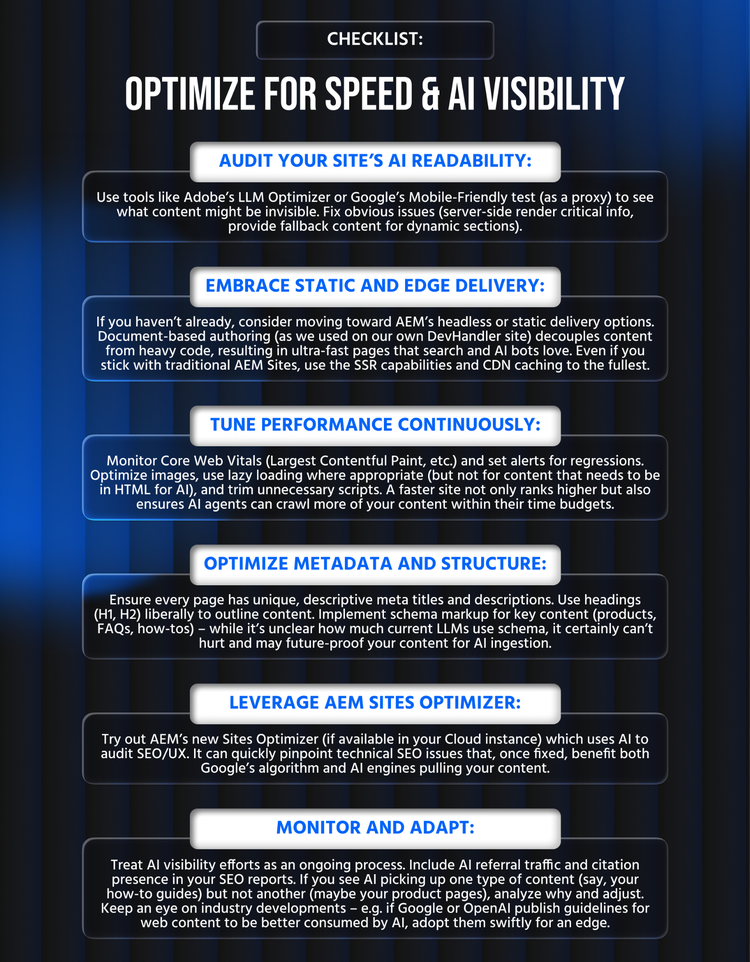
Adobe has started providing tools to help with this “AI visibility” aspect. The LLM Optimizer Chrome extension (branded “Is Your Webpage Citable?”) lets you preview how an AI crawler sees your page and gives a readability score. Enterprise teams should incorporate this into their QA: when you publish or update pages, especially those meant to be authoritative resources, run the tool and see if anything is missing. It highlights the gaps (e.g. “500+ words invisible to AI”) so you can take action – perhaps by changing how content loads or adding that content to the initial payload. Adobe’s early analysis with this tool found 80% of tested enterprise sites had critical content visibility gaps, such as content only appearing after user interaction or missing metadata. By systematically fixing these (e.g. server-side render critical info, add proper meta tags), you not only improve your GEO (Generative Engine Optimization) but often boost traditional SEO as well – it’s a win-win.
Performance optimization for AI-generated content should also consider the nature of that content. If your AI is generating a lot of images (via Adobe Firefly or others) for personalized experiences, ensure you’re using AEM Assets or Dynamic Media to optimize those images (right format, size, compression). If AI is generating long-form text, ensure it’s broken into digestible chunks with subheadings – not only for readers, but to allow AI summarizers to extract key points easily. AEM’s Cloud Manager and Monitoring tools, plus real-user monitoring (RUM), can help ensure that as you ramp up content quantity, your site stays fast. If any performance issues arise (e.g. publish flushes causing load, or new content types slowing pages), address them immediately – speed is not a “nice to have,” it’s a must for both UX and SEO.
Lastly, monitor AI-driven traffic just as you monitor organic search. In your analytics, track referrals from known AI sources (for instance, Bing’s new Bing Chat might show a specific user agent or referrer, and Google SGE traffic might appear as coming from googleapis.com). While still a small portion, this traffic is growing rapidly and tends to be high quality. By tracking it, you can get a sense of which pages are being picked up by AI answers. If some high-value pages are never getting AI referrals, that’s a signal to investigate why – perhaps the content isn’t AI-readable or lacks authority. It’s analogous to monitoring search impressions: you want to know if you’re in the game. Generative AI search is new territory, so treat your efforts as experimental and iterate: try things like adding an FAQ section to a page (to see if that gets you cited in Q&A style answers) or writing a more factual paragraph summary at the top of pages (maybe the AI will latch on to that). Measure the results, and adjust your content SEO (or “GEO”) strategy accordingly.
2026 Playbook: Phased Implementation
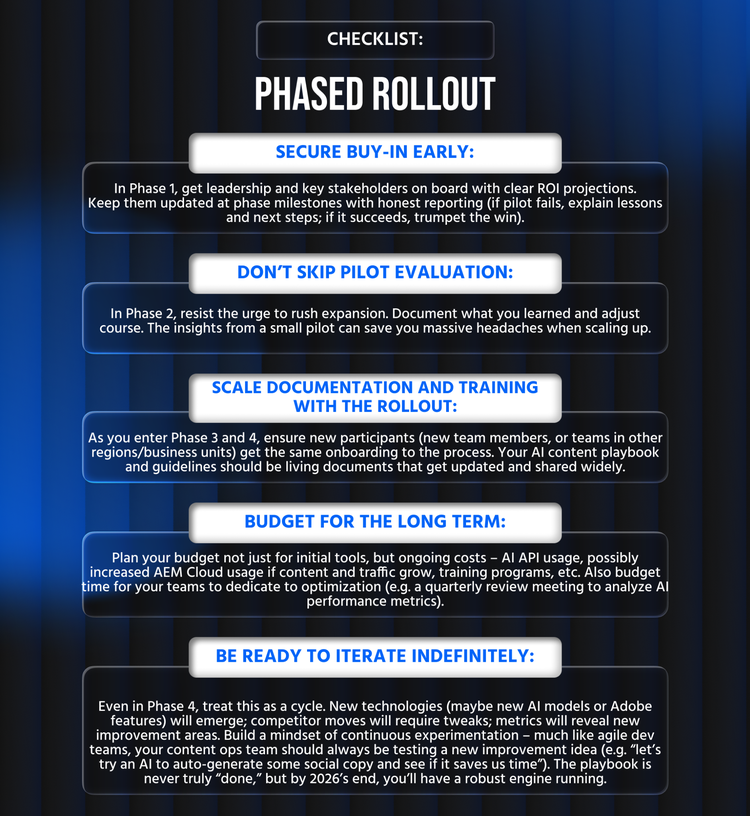
Operationalizing AI-generated content at enterprise scale isn’t a flip-a-switch exercise – it’s best approached in phases. Below is a pragmatic playbook that you can execute over the coming quarters of 2026. It breaks the transformation into manageable stages, each with clear goals.
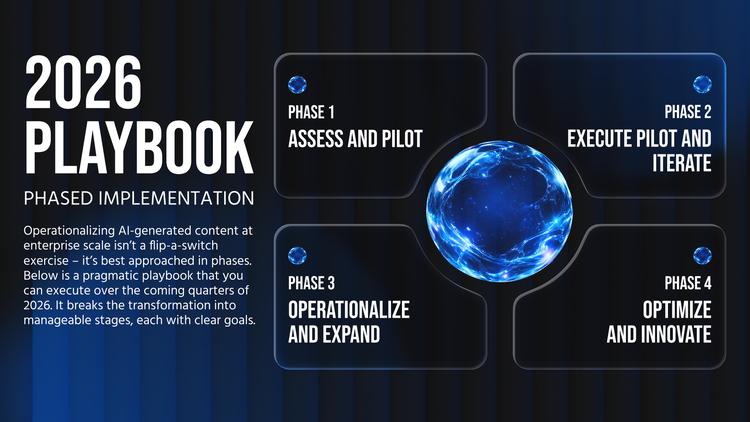
Phase 1: Assess and Pilot (Foundation)
Timeframe: Early stage (Month 0-2)
Key Actions: Assemble a core team and align stakeholders. Begin with an assessment of your current content operations: Where are the bottlenecks? What content types could benefit most from AI assistance (e.g. product descriptions, blog articles, email copy)? Also evaluate your AEM environment: Are you on AEM as a Cloud Service (ideal for using the latest AI features), or older versions that might need extensions? Define success criteria for AI involvement – for instance, “reduce content production time by 30%” or “double the output of our blog without adding headcount.” Develop a roadmap and secure executive sponsorship by pitching the ROI of AI at scale (cite the kind of efficiency gains discussed above to make the case).
Next, choose a pilot project. Pick a low-risk, high-learning scenario. Examples: generate meta descriptions for a section of your site, or have AI draft a handful of blog posts on less critical topics. The pilot should be small enough to fail safely, but meaningful enough to prove value. During Phase 1, also tackle the groundwork: draft the governance guidelines and get the RACI in place. If needed, do technical prep like enabling AEM’s GenAI features (ensure your AEM version is up-to-date; install any required addons) or setting up API access to an external AI service. Start training your team with workshops and maybe even a demo of AI generation in AEM to spark ideas. Output of Phase 1: a documented plan, a trained core team, and a pilot ready to execute.
Phase 2: Execute Pilot and Iterate (Proof of Concept)
Timeframe: Mid stage (Month 3-4)
Key Actions: Run the pilot project you defined. For example, let’s say the pilot is using AI to generate initial drafts of weekly blog posts. In this phase, actually do it: have the content author use the AI tool to create a draft, run it through the review process, publish the content, and measure results. Treat this as a learning sprint. Encourage team members to log what worked and what didn’t. Maybe the AI drafts required more editing than expected – why? Were the prompts insufficient, or did the AI lack context? Perhaps compliance had to heavily rewrite sections – was that due to unclear guidelines that can be refined? Capture these insights. It’s helpful to have a retrospective meeting at the end of the pilot cycle to discuss: did we meet our success criteria? (E.g., was content production faster? Was quality maintained?) What unexpected challenges arose (tool limitations, team resistance, etc.)?
During Phase 2, you might do multiple iterations of the pilot in a few cycles to gather enough data. This is also the time to refine processes: maybe update your prompt templates, adjust the RACI if roles were overlapping, or tweak the workflow (perhaps legal review wasn’t needed for certain content after all, or perhaps you discovered it is needed for something you assumed was low-risk). If the pilot shows positive results – e.g., faster turnaround or increased content output with acceptable quality – document that win. For instance, if you were able to produce 5 blog posts in a month instead of 2, with the same team, that’s a concrete success to publicize internally. Output of Phase 2: a validated proof-of-concept, refined guidelines/workflows, and (ideally) some quick wins to showcase.
Phase 3: Operationalize and Expand
Timeframe: Scaling stage (Month 5-8)
Key Actions: Now that you have confidence in the approach, integrate AI into your standard operating model for content. This means rolling out the processes to more teams or content types. You might start incorporating AI-generated content for product pages, emails, social media copy – whatever areas make sense. It’s important to formalize governance at this stage: ensure that the QA gates and approval processes are well-understood by all participants. Possibly develop checklists or update your content calendar templates to indicate when AI is used (so everyone is aware). If your organization is larger, you might create an internal “AI Content Center of Excellence” or at least a Slack channel/community of practice where lessons and tips are shared across teams.
On the technical side, Phase 3 is when you integrate more deeply. For example, connect AEM with your project management or DAM systems if needed to streamline asset creation with AI (Adobe’s Sensei can auto-tag and even suggest crops for images – turn those on to assist your DAM workflow). If you were using external AI via a quick script in Phase 2, you might build a more robust integration now (e.g. a custom AEM UI plugin for authors to request an AI-written draft without leaving AEM). Also consider scalability: as more content is generated, is your publishing pipeline handling it? Monitor publish queue times, replication, etc., to ensure no bottlenecks. You may need to adjust dispatcher caching rules if you suddenly have many new pages (to ensure they’re cached on publish). Basically, tune the plumbing now that volume is increasing.
Change management is crucial here. Involve your corporate communications or HR to highlight the success of the pilot and reassure any skeptics that AI is augmenting, not replacing, the creative process. Perhaps run internal showcase sessions: e.g., have a content author demonstrate how they use the AI assistant in AEM to the wider marketing team – this helps build buy-in and excitement. Address concerns openly, especially from content creators who might fear for their roles. Show them that the quality control and creative judgment remain in human hands (as evidenced by your governance process), and that AI is helping with the grunt work to free them for higher-value tasks.
By the end of Phase 3, AI-assisted content creation should be a normal part of your operations for multiple content streams, with a track record of safe, quality output. Output of Phase 3: AI content ops “industrialized” – documented processes, trained teams across the organization, tech integrations in place, and steady content production with AI assistance.
Phase 4: Optimize and Innovate
Timeframe: Mature stage (Month 9-12 and beyond)
Key Actions: In this phase, you focus on optimization and continuous improvement. Now that you have significant AI-generated content flowing, leverage data to optimize. Revisit your KPIs (covered in the next section) regularly – are you hitting the speed and quality targets? For example, if your goal was a 30% reduction in content turnaround time and you’ve plateaued at 20%, identify the constraint. Maybe compliance review is still too slow – perhaps introduce an AI tool to pre-screen content for compliance to assist the legal team, or provide more training to the AI model so it makes fewer errors requiring revision.
You should also look to innovate and expand use cases. By 9-12 months in, your team might be comfortable with AI for text content – perhaps now you pilot AI for personalizing content (e.g. generating variant copy for different audience segments automatically) or for translations (many companies start using AI to draft localized versions of content, with human translators then polishing it). Adobe’s evolving toolkit (e.g. the Agent Orchestrator introduced in 2025) may allow you to automate experimentation – Phase 4 could include setting up AI-driven A/B tests at scale, where the AI not only generates variants but also helps analyze results. Consider if custom AI models would benefit you: for instance, train a small language model on your product documentation so it can be used to generate ultra-fact-checked content or answer customer questions with direct knowledge.
Also double down on performance and SEO gains. If you haven’t achieved that 100 Lighthouse SEO or perfect AI readability score, target those in this phase. It might involve deeper refactoring (e.g. migrating an old section of your site to the new architecture). The investment is worth it if those pages are important to your AI or search traffic strategy.
Finally, institutionalize the practice. Update job descriptions if needed (maybe “AI content editor” becomes a role). Set up ongoing training for new team members on the AI tools. Keep an eye on Adobe’s releases – they are likely to enhance AEM’s AI capabilities continuously, so plan upgrades or feature toggles accordingly (for example, if an update brings a better Content Assistant or new model options, allocate time to test and adopt it). Also, share success stories: by Phase 4 you should have some impressive numbers – e.g. how much more content you’re delivering, how much faster campaigns go live, improvements in SEO or conversion metrics. Publicize this internally (and even externally as a case study) to reinforce the value. It will help maintain support (and budget) for the AI-driven approach.
Output of Phase 4: A fully matured AI-integrated content operation that is faster, smarter, and continuously improving – plus a culture that embraces data and AI in the creative process. At this stage, AI isn’t a “project” anymore; it’s part of business as usual, with your team constantly tweaking and evolving it as a competitive asset.
Common Failure Modes (and How to Avoid Them)
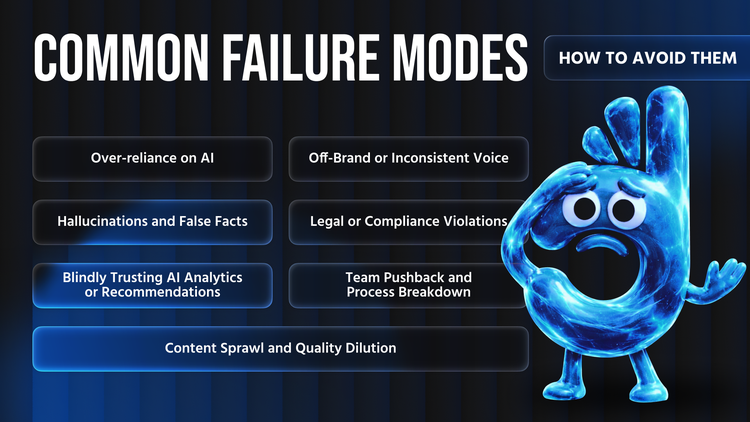
- Publishing without human review: Make “AI = draft” a hard rule. Enforce approvals in workflow so review can’t be skipped.
- Off-brand voice: Use brand voice guidelines in prompt templates; consider tuning on your content archive; feed edits back into prompts.
- Hallucinated facts: Require verification for every claim, date, and statistic. If it can’t be confirmed, remove it.
- Legal/compliance slip-ups: Add compliance gates, forbidden-phrase rules, and automated checks (plagiarism/toxicity), plus legal review where required.
- Over-trusting AI recommendations: Use AI to surface patterns, but validate decisions with real analytics and human judgment.
- Team pushback or workarounds: Treat as change management—start with volunteers, train continuously, and share measurable wins.
- Content sprawl: Don’t chase volume. Tie every asset to strategy and audience need; measure performance and prune thin or redundant content.
KPIs and Measurement
To manage any initiative at scale, you need to measure it. KPIs (Key Performance Indicators) will tell you if AI-assisted content is actually speeding things up, maintaining quality, and delivering business value. They also help prove ROI to stakeholders. For an AI-at-scale content operation, consider KPIs in the following areas:
- Speed & Efficiency: This is often the primary driver for using AI. Measure how fast content moves from ideation to publication. Key metrics: Content Turnaround Time (e.g. days or hours from brief to publish – track this for AI-assisted pieces vs historical baseline). Publishing Frequency – how often you’re releasing content (e.g. posts per week). One DevHandler client’s team went from 1-2 content releases per month to deploying content twice a week after process improvements – that’s a tangible boost in agility. Track the throughput: content pieces published per month per content creator. If AI is working, a single author should be able to output more. Also measure effort saved if possible: for instance, if an AI generated draft saves an author 2 hours per article, that’s efficiency (some teams even log time spent per piece to quantify this). Another KPI could be Time to respond to content needs (say a trending topic emerges – how fast can you spin out a relevant piece now vs before?).
- Quality & Engagement: All the speed in the world is useless if quality drops. Ensure to monitor content quality indicators. Engagement Metrics: time on page, bounce rate, social shares, comments – compare AI-assisted content with purely human-written (if there’s a noticeable dip, investigate why). Conversion Rates: If content has a CTA (sign-ups, downloads, etc.), track those conversions. Interestingly, well-governed AI content can perform as well as or even better than traditional content. For example, in an Adobe case study, an AI-generated headline variant outperformed the original by 15% in click-through rate. KPI examples: number of AI-generated content pieces that rank in top 10 search results (shows quality and SEO combined), or average pages per session for visitors who read AI-generated content (shows if they find it valuable). You might also have internal quality scores – some organizations have editors rate content on a rubric (clarity, tone, grammar) – ensure AI content scores remain high. If using A/B tests, track winner rate of AI variants (how often the AI version wins over existing content).
- Risk & Compliance Metrics: We hope your compliance issues remain at zero, but track it explicitly. For instance, Number of compliance incidents or rejections – how many pieces got flagged by legal or had to be pulled back after publish. The goal is to keep this at or near zero. If it spikes, that’s a red flag (either AI is going off rails or review process failing). Another metric: Revision Rate – how many rounds of edits do AI-generated pieces go through versus normal. If AI pieces require 5 revision cycles on average when normal content needed 2, you’re losing efficiency – better prompts or training might be needed. Conversely, if review cycles drop over time, that signals your governance and AI are improving. Also measure Team Sentiment perhaps qualitatively – are editors feeling overloaded catching AI mistakes? Periodic surveys could gauge how comfortable staff are with content quality (not a classic KPI, but a health metric). And of course, ensure privacy/security incidents = 0 (e.g. no cases of someone leaking data via prompts) – if there is any, treat it seriously and tighten controls/training.
- Reuse & Content ROI: A big promise of AI is content reuse – the ability to repurpose content into different formats or personalize at scale without multiplying effort. Track Content Reuse Rate: for example, how many derivative assets you create from a core piece. If you produce one whitepaper and then AI helps create 5 blog snippets, 10 social posts, and an infographic from it, that’s a high reuse factor. You could set a KPI like “each core content piece is reused in X channels” and see if AI helps increase X. Also measure Localization efficiency if applicable: how many locales you’re able to cover with AI translation assist versus before. If previously you did 2 languages and now do 5 with the same team, that’s a win (measure translation turnaround time and cost per word perhaps). Another angle: Content Refresh Rate – AI can help update existing content (like refreshing old blog posts with new info). How many pieces did you refresh this quarter vs before? If more, that’s content longevity being improved. In essence, this category is about getting more mileage from each piece of content. Also track waste reduction – e.g., reduce the number of content pieces created but never used. With AI generating drafts, maybe you experiment more and only finalize the ones likely to perform (though be careful to measure if this is actually happening).
- SEO & AI Visibility: Since we’ve emphasized GEO, have KPIs specifically for search performance. Organic Search Traffic to AI-influenced content – is it going up? (One client improved SEO traffic after performance optimization, as noted with a PageSpeed score jump from ~70 to 95 – performance and content freshness likely played a role). Also track keywords rankings for content created with AI assistance – are they ranking similarly to others? For AI visibility, if you can get data on AI search citations (Bing’s webmaster tools might show if you’re cited, or Adobe Analytics might catch referrals from Bing chat etc.), track those counts. It’s an emerging metric, but you could say “we want X number of citations in AI answers by end of quarter” and optimize for it. Also use the LLM Optimizer or similar to get a Citation Readability Score – try to improve the average score of your key pages over time (close the gap of invisible content). Core Web Vitals can be a KPI here as well, since it directly ties to SEO: aim for, say, 90+ percentile in CWV for all new pages.
- Cost & Productivity: While not explicitly listed in the prompt, you might also consider the cost dimension. Track content cost per piece (including AI tool costs) versus before. If you’re using a paid API, measure cost per word or per article and ensure ROI (maybe compare to freelance writer costs that you offset). Productivity metrics can include how many pieces per content FTE (full-time employee) are delivered now. The goal isn’t to cut staff, but to handle growing demands with the same team – show that through numbers.
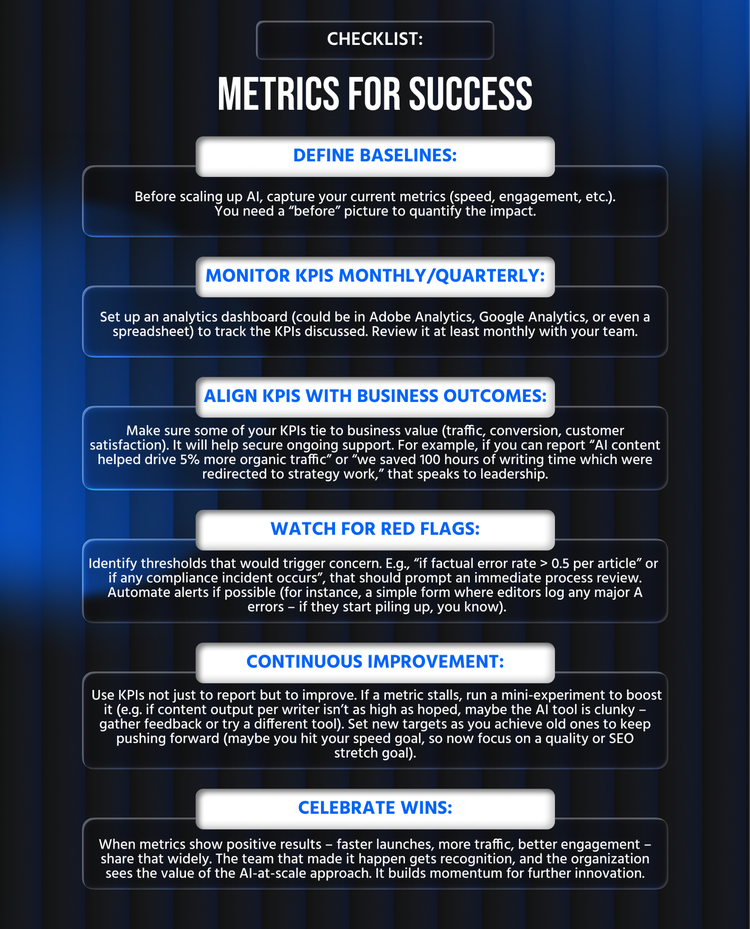
A good practice is to create a dashboard combining these KPIs. For example, DevHandler often sets baseline metrics at project start (current avg content throughput, CWV scores, etc.) and then tracks improvement. Make the metrics visible to the team – it helps maintain focus and also celebrate progress. If you see content cycle time dropping from 10 days to 5 days, that’s a morale boost: the team knows the new process works. Conversely, if something like bounce rate creeps up, it flags a need to check quality.
Remember the adage: “if you can measure it, you can improve it”. Regularly review these KPIs in your team meetings. Tie them to your goals (e.g. if improving SEO is a company goal, show how AI-assisted content contributed by producing more optimized content quickly). Use the data to iterate: low conversion on AI pages? Maybe the content needs tweaking or the AI missed a key user intent – go fix it.
DevHandler CTA – Making AI + AEM Work for You
Scaling AI content in AEM is a journey, and having the right partner can accelerate your success. At DevHandler, we’ve been at the forefront of blending Adobe Experience Manager with AI to drive real results. We’re an Adobe-focused consultancy (proudly Ukraine-based, delivering Eastern European tech excellence) that doesn’t just talk the talk – we implement and optimize modern AEM architectures in practice. For example, we built our own site using the latest AEM Cloud and document-based authoring approach to achieve top-tier performance and SEO, and we’ve helped clients double their content release frequency while boosting quality. We know what pitfalls to avoid and how to tailor solutions to enterprise needs.
If you’re looking to operationalize AI-generated content at scale, DevHandler can help every step of the way – from assessing readiness, to setting up AEM’s AI integrations, to designing governance workflows that satisfy your compliance team. We bring deep AEM expertise (10+ years) combined with a startup-like agility to quickly pilot and iterate on new approaches. Our cross-functional pods (AEM architects, developers, QA, content specialists) integrate seamlessly with your team, ensuring transparency and clear ownership (as our RACI model above illustrates, we’re big on clarity and accountability). And as an Eastern European firm, we offer both high-quality engineering and cost-effective value – essentially, you get top-tier results with boutique attentiveness.
We invite you to leverage our experience. Check out our blog for related insights – for instance, our piece on AEM as a Catalyst for Business Scaling discusses how modern AEM practices (now including AI) can unlock growth, and Is Your Enterprise Website Citable in AI Search? offers a deep dive into the SEO+AI visibility challenge we summarized in this article. These resources can give you a deeper understanding of the concepts we’ve outlined.
Ultimately, whether you are just starting with a pilot or aiming to refine a mature operation, DevHandler is ready to assist as your trusted partner in this AI content journey. We can help you avoid the common failure modes, implement a robust operating model, and harness the full power of AEM’s evolving capabilities (like the new GenAI features and edge architectures) for your organization’s benefit.
Ready to unlock scalable content creation in AEM? Feel free to reach out to us for a discussion about your goals and challenges – we’re here to help you make it real.
Read more: